


Jack’d - Gay Chat & Dating
4.020.75K Reviews
App Specs
- Version
- 8.13.2
- Updated On
- License
- Free
- Downloads
- 5,000,000+
- Developer
- Perry Street Software
- Categories
- Social
- Platform
- Android, iOS
Screenshots

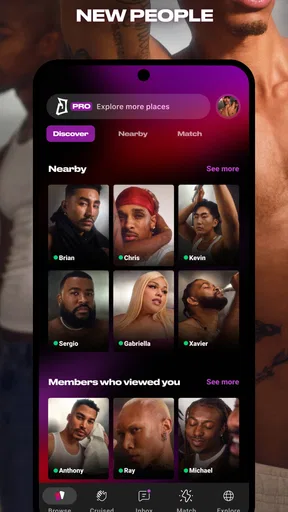
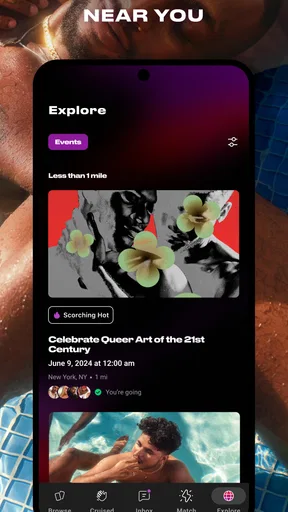
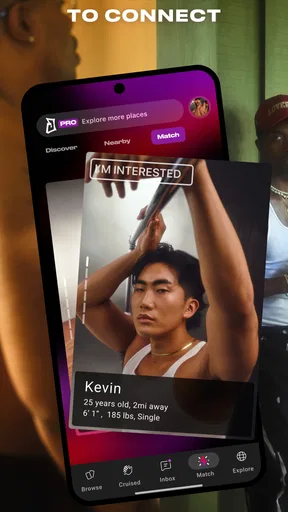
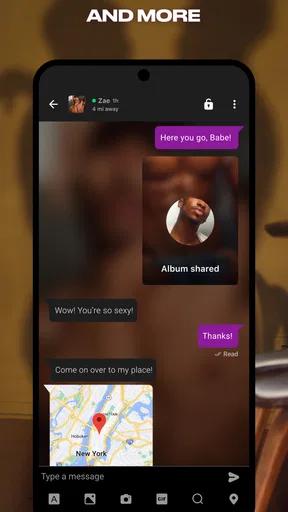
 Analysis by AppCompare
I approached Jack’d as a social app first and a dating app second, because that is how it feels in daily use: a place to browse nearby profiles, start conversations, and decide whether a connection deserves more time. It is made by Perry Street Software for a mature gay audience, and its long presence on mobile is easy to understand once you spend time with it. The basic idea is direct, but the quality of the experience depends heavily on how comfortable you are with location-based discovery, quick profile judgments, and conversations that may begin with very little context.
What interested me most was not simply whether I could find people to chat with. I wanted to see how practical the app felt for different abilities and situations: reading profiles without rushing, moving through a busy screen, handling messages when attention is limited, and using it safely when I was not in the ideal environment. My conclusion is positive but measured. Jack’d can be useful for meeting people and keeping an active social routine, yet it rewards users who take control of their pace and boundaries rather than treating every nearby profile as an invitation.
How readable and navigable is the experience?
The interface is built around the central task of seeing people and deciding what to do next. That makes the learning curve fairly gentle. I did not need to understand a complicated system before browsing, opening a profile, or starting a chat. For someone who wants a focused way to meet other gay men, that simplicity is a strength compared with broader social networks where dating and friendship tools are mixed into a much larger feed.
At the same time, a simple layout is not automatically an easy layout. A grid or stream of profile photos can become visually demanding, especially when many faces, labels, icons, and conversation indicators compete for attention. I found that the app works best when I treat browsing as a short activity rather than an endless task. Looking at a smaller group of profiles, opening only the ones that genuinely interest me, and leaving the app before fatigue sets in made the experience considerably clearer.
Profile quality also affects navigation. A profile with a clear photo and a few useful details gives me a reason to continue. A profile that offers almost no context forces me to guess what the person wants, whether they are active, and whether a message would be welcome. That is not exactly a navigation fault, but it changes how much mental effort the app demands. Jack’d gives people a quick way to present themselves; users still have to decide how much information is enough for a meaningful conversation.
I recommend setting a personal browsing rule before using it. For example, I might review profiles for a few minutes, save my attention for conversations that show some effort, and ignore repeated low-context messages. This is a small habit, but it makes the app feel less like a stream of interruptions and more like a tool I control. It is particularly helpful for users who find rapid visual choices tiring or who prefer predictable routines.
The app is free to download and use, while optional purchases range from about one dollar to nearly ninety dollars per item. That matters for navigation because paid prompts or extra options can change the rhythm of browsing. I would not spend money simply because the app presents an upgrade at a moment of frustration. I would first use the free experience long enough to identify a specific problem, then decide whether a purchase solves that problem in a way I actually value.
Worth Reading Before You Choose

EA SPORTS FC Mobile 26 Is a Bigger Football Game, but It Takes Time

Flipboard Shows What News Apps Must Do Beyond the Feed

Switching to Android Auto Means Rethinking Your Driving Routine

Google Calendar Makes a Crowded Week Easier to Manage

Ludo King Makes the Most of the Minutes Between Plans

Baby Panda World Brings Quick Play to Modern Phones, but Its Game Library Feels Busy
Jack’d has been available since February 2011, and its established identity helps it feel less experimental than a brand-new social app. Its current version is 8.13.2, with Android support starting at version 7.0. For people using older phones, checking compatibility before planning around the app is sensible. On a supported device, the basic path from browsing to messaging is easy to understand, but the emotional and visual noise of the community requires more personal organization than the controls alone might suggest.
Reading profiles without rushing
One of my most useful habits was separating profile reading from message writing. I would first look for enough information to understand the person’s tone and likely purpose, then decide whether I wanted to respond. This avoids the common trap of opening a chat simply because a photo caught my attention. It also helps users who process information more slowly, because there is no need to make every decision immediately.
For people who rely on larger text or display magnification, the practical question is whether the screen remains comfortable when text expands. I would test the app with the phone’s own display settings before committing to regular use. A layout that works at the default size may require more scrolling or tighter attention when enlarged. That is not a reason to dismiss Jack’d, but it is a reason to evaluate it in the same settings I use every day rather than assuming the default presentation will suit me.
Screen readers and other assistive tools can be valuable for navigating any social app, but the usefulness of those tools depends on how clearly interface elements are labeled and ordered. I would test the main tasks directly: opening a profile, returning to the browsing area, locating a conversation, and sending a message. If one of those steps becomes confusing, I would consider using Jack’d for messaging only or pairing it with a more accessible way to organize contacts and appointments.
Motor, sensory, and attention considerations
Dating apps often ask for many small gestures: tapping a profile, swiping or scrolling, selecting a conversation, typing, and moving between screens. Jack’d is no exception. That can be manageable for users with steady touch control, but repeated gestures may be tiring for people with limited dexterity, tremor, joint pain, or fatigue. I found that using shorter sessions and avoiding rapid browsing reduced the number of accidental actions.
A useful workflow is to write longer replies in a separate notes tool, review them, and then paste the final version into the conversation. This is not as spontaneous as typing directly, but it reduces pressure and gives me a chance to check tone before sending. It can also help users who need more time to compose messages or who find the small on-screen keyboard difficult. I would still review the final recipient carefully before sending, since copying text introduces its own risk.
Sensory comfort is another important issue. Profile photos, notifications, and the expectation of immediate replies can create a high-alert feeling. I prefer to silence notifications when I am working, traveling, or resting, then check messages at a deliberate time. That simple change makes the app more usable for anyone sensitive to sound, flashing alerts, or constant interruptions. It also improves conversations because I am responding when I can actually pay attention.
For users with hearing loss, the text-based nature of chat is naturally more practical than an app centered on voice calls. However, written conversation can still be ambiguous. Short messages, slang, and unclear intentions may require extra clarification. I found it helpful to ask direct questions early rather than trying to infer meaning from a few words. That approach benefits users with different communication styles and reduces misunderstandings that can otherwise become uncomfortable.
Users with visual sensitivities may want to lower screen brightness, use a warmer display setting, or avoid browsing in dark rooms. These adjustments come from the phone rather than from a promise about Jack’d itself, so I would judge the app in the configuration that protects my eyes. The same applies to motion and animation: if transitions feel uncomfortable, I would keep sessions brief and rely on the simplest route through the app instead of repeatedly moving between areas.
When attention and privacy compete
The most overlooked accessibility issue in a dating app is cognitive load. A person may be able to read and tap everything correctly but still feel overwhelmed by too many choices, unclear intentions, or a crowded inbox. My solution was to define what I was looking for before opening the app. Friendship, casual conversation, dating, and meeting in person are different goals, and mixing them together makes every profile harder to evaluate.
I also found that writing a short profile description in plain language can reduce repetitive questions. It does not need to reveal sensitive details. A few boundaries and a clear statement of what kind of interaction I want can save energy later. This is a practical advantage for users who find repeated explanations exhausting, and it gives respectful people a clearer way to start a conversation.
Using Jack’d in real situations
Jack’d makes the most sense when I have enough time and privacy to make deliberate choices. A realistic example is arriving in a new city for a weekend. I might browse before going out, exchange a few messages, and decide whether a public coffee shop is appropriate for a first meeting. The app can help turn an unfamiliar place into a social possibility, but it should not replace basic planning. I would share the meeting details with someone I trust, keep control of my transport, and avoid treating a profile as proof of identity.
Another scenario is using it during a lunch break. That can work if I only want a short conversation, but the setting creates pressure to answer quickly. I would avoid beginning a serious or emotionally complicated exchange when I have to return to work in a few minutes. Turning notifications off afterward is also worthwhile, because an unfinished conversation should not dictate the rest of the day.
Travel and weak connectivity can change the experience. I would not rely on the app as my only way to contact someone I have just met, especially if I am moving between unfamiliar areas. Exchanging another agreed method of contact can be sensible, but I would do so selectively and only after trust has developed. Keeping the first meeting public remains more important than making communication convenient.
Jack’d is also useful for people who want a community-oriented dating space rather than a general social network. Its mature 17+ rating signals that it is not intended for children, and I would treat that boundary seriously. Adults who are not comfortable with adult dating conversations, location-based discovery, or direct approaches should choose a different kind of social app. The mature setting does not mean every interaction will be explicit, respectful, or suitable for every user.
For someone with limited energy, the app can fit a low-pressure routine if used intentionally. I might open it once a day, answer two conversations, and leave. That is more sustainable than trying to maintain constant availability. The trade-off is that I may miss fast-moving opportunities, but I gain control over attention and reduce the chance of agreeing to something simply because I felt rushed.
Safety, boundaries, and the cost of convenience
Location-aware social discovery is useful because it can make meeting people feel immediate. It is also the feature category that deserves the most caution. I would avoid sharing my exact home address, workplace details, travel schedule, or identifying documents in chat. A nearby profile is not automatically a trustworthy profile, and a friendly conversation is not the same as verification.
My preferred first-meeting workflow is deliberately boring: exchange enough messages to identify basic compatibility, choose a busy public place, arrange my own way home, and tell a friend where I will be. I would not let a request for secrecy, money, intimate images, or urgent travel change that plan. If someone becomes hostile after I set a boundary, I would stop engaging rather than trying to repair the conversation.
Blocking and reporting tools are important in any dating service, but I would not wait for a dramatic incident before ending contact. Repeated pressure, insults, demands for personal information, or refusal to respect communication preferences are enough reason to leave a conversation. This is especially relevant for users who may already spend extra energy managing sensory, cognitive, or social demands.
Purchases deserve the same deliberate approach. Because individual in-app items can cost from around one dollar to almost ninety dollars, I would review the purchase screen carefully and avoid buying while frustrated by a quiet period or an unanswered message. No paid option can guarantee chemistry, safety, or a respectful response. The free version is the sensible starting point for most people, and paid features should be judged as convenience rather than a shortcut to connection.
Where the app still creates friction
The biggest limitation is that fast profile browsing can encourage shallow decisions. Photos are useful, but they cannot explain communication style, accessibility needs, or whether someone respects boundaries. Jack’d gives me access to potential connections; it does not do the harder work of helping two people understand one another. I have to supply that judgment through questions and patience.
Another barrier is uneven self-presentation. Some users write carefully, while others provide almost no information. That inconsistency makes the app less predictable for people who need context before starting a conversation. A broader social network may offer more background through shared communities, posts, or mutual connections, while a specialized dating app usually offers a faster but thinner first impression. Jack’d sits firmly on the quick-discovery side of that trade-off.
People who need extensive accessibility customization may also find the experience limiting if the phone’s own settings do not solve every problem. I would not choose it as my only social outlet if I depended on highly structured navigation, unusually large controls, or a completely quiet environment. In that case, a slower community platform, moderated group, or text-first service may be a better fit, even if it offers fewer nearby matches.
Privacy-minded users should consider whether the convenience of local discovery is worth the personal information involved in participating. Someone who prefers to keep location and identity details separate may feel more comfortable with a platform organized around interest groups rather than proximity. Likewise, users seeking long-form compatibility tools may prefer a service that emphasizes detailed profiles and questionnaires over immediate visual browsing.
There is also an emotional barrier that no interface adjustment can remove. Rejection, silence, and mismatched expectations are normal possibilities in this category. I would not recommend Jack’d to someone who is currently looking for guaranteed reassurance or who finds unanswered messages especially destabilizing. Using it successfully requires accepting that many interactions will end quickly and that this is not necessarily a judgment of personal worth.
My inclusive verdict after living with the app
Jack’d is a practical choice for adults who want a focused gay social and dating app with a straightforward path from discovering profiles to chatting. Perry Street Software has built a recognizable service that has remained available for many years, and its audience helps it feel more relevant than a general-purpose platform for users who want this particular community context. It has an average rating of 4.0 from roughly 118 thousand ratings, with more than 5 million installs, so it clearly has a substantial user base.
I would recommend it to someone who values nearby discovery, prefers text conversation, and is willing to manage their own pace and boundaries. It can work well for a traveler, a person rebuilding a social life, or someone who wants a direct way to meet men without sorting through unrelated content. The app is free to begin with, but I would treat every optional purchase as a choice to evaluate carefully rather than a necessary part of participation.
I would suggest skipping it, or using it only occasionally, if you need highly predictable navigation, extensive built-in accessibility controls, long-form compatibility information, or a strongly moderated environment. Users who dislike location-based interaction or who want every conversation to begin with substantial context may feel more comfortable elsewhere. A general social network can be better for shared-interest communities, while a slower dating service may suit people who prefer detailed profiles and fewer snap judgments.
My strongest advice is to make the app fit your needs instead of adapting your wellbeing to its pace. Adjust the phone for comfortable reading, silence notifications when concentration matters, write boundaries clearly, and use short sessions when browsing becomes tiring. Separate online interest from real-world trust, and plan first meetings with the same care you would use with any stranger.
In the end, Jack’d is neither a complete answer to social connection nor a difficult app by default. It is a direct tool whose usefulness depends on the user’s goals, energy, communication style, and comfort with proximity-based dating. For me, its best quality is the ability to make social discovery feel immediate without requiring a large public profile elsewhere. Its main weakness is that immediacy can come at the cost of context. Used slowly, selectively, and with clear boundaries, it can be a worthwhile part of an inclusive social routine.
Pros
- Large LGBTQ+ user base in many cities and regions.
- Profiles can show interests
- tribes
- and relationship preferences.
- Useful filters help narrow matches by distance and preferences.
- Messaging tools make it easy to start conversations quickly.
- Available on both Android and iOS devices.
Cons
- Some useful features require a paid subscription.
- Location-based browsing may raise privacy concerns for some users.
- Profile quality and activity can vary greatly by area.
- The app may include occasional ads or promotional prompts.
- Users should remain alert for fake profiles and unwanted messages.
FAQs for Jack’d - Gay Chat & Dating
What is Jack’d – Gay Chat & Dating used for?
Jack’d is a social and dating app designed primarily for gay, bisexual, trans, and queer men. After creating a profile, users can browse nearby or worldwide members, exchange messages, send photos, and discover people interested in dating, friendship, conversation, or casual connections. The experience depends heavily on the users available in your area and the preferences you choose.
Is Jack’d free to download and use?
Jack’d can generally be downloaded for free on supported Android and iOS devices, and the free version provides access to essential features such as profile creation, browsing, and messaging with certain limitations. Some advanced tools may require a paid subscription or in-app purchase. Before subscribing, check the current pricing, renewal terms, and included features shown in your local app store.
How can I protect my privacy and safety on Jack’d?
Avoid sharing your home address, workplace, financial information, passwords, or other sensitive details with people you have just met. Review your profile visibility and location settings, use the block and report tools when necessary, and be cautious with links or requests for money. If arranging an in-person meeting, choose a public place, tell someone you trust, and leave if anything feels uncomfortable.
Does Jack’d require location access, and can I control who sees me?
Jack’d uses location-related information to help display nearby profiles and make local discovery more useful, although the exact options can vary by device, app version, and subscription level. You can manage location permissions through Android or iOS settings and should review the app’s privacy controls before using it. Remember that approximate distance or profile details can still reveal more than intended.
What should I do if I encounter fake profiles, harassment, or inappropriate content?
If a user behaves abusively, sends unwanted material, appears to be impersonating someone, or asks for suspicious payments, stop communicating and use Jack’d’s block and report functions. Save relevant information only if it can help with a report, but do not place yourself at risk. For threats, blackmail, or suspected criminal activity, contact local authorities and seek support from someone you trust.


